
Purview DLP Incident Management (IM) – From Alert to Outcome #10
Purview DLP Incident Management (IM) – From Alert to Outcome #10
Phase 4 – Tools and Architecture
DLP Integration Patterns.
Overview
Post 09 covered which tooling model fits your operating model. This post covers how to build the connections between those tools. The data flows, configuration requirements, and design considerations for each integration pattern.
Quick recap
In Post 09, we introduced VisionStack’s DLP Tooling Decision Model, a structured way to determine where DLP incidents should live based on your operating model, not your feature wish-list.
The five models on the table were:
- Defender XDR native,
- Sentinel-centric,
- ITSM-centric,
- custom API pipeline, and
- O365 Management API for compliance audit logging.
This post goes one level deeper into the integration mechanics for each.

How DLP data flows out of Purview
Before getting into the integration patterns, it helps to understand the data origination model. DLP incidents and alerts don’t start in Defender XDR or Sentinel, they start in Microsoft Purview, as policy match events across workloads.
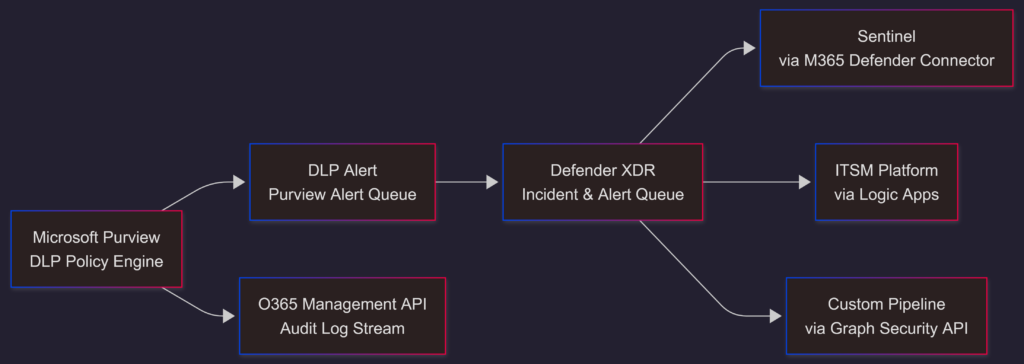
The key architectural point: Defender XDR is the hub. Every downstream integration – Sentinel, ITSM, custom – flows through Defender XDR, not directly from Purview. The O365 Management API is the only path that bypasses Defender XDR entirely, pulling directly from the audit log stream.
Pattern 1 – Defender XDR to Microsoft Sentinel
Integration mechanism: Microsoft Defender XDR connector in Microsoft Sentinel.
This is the recommended integration path for Sentinel-centric SOC environments. The connector ingests DLP incidents and alerts from Defender XDR into Sentinel’s SecurityIncident and SecurityAlert tables, making them available for KQL analytics rules, workbooks, and playbook automation.
What gets ingested:
- Full incident metadata: title, severity, status, assigned to, creation and update times
- Alert detail: policy matched, workload, user identity, evidence type
- Incident entity data: users, files, emails associated with the incident
What does not get ingested:
- Full evidence content: The connector ingests alert and incident metadata, not the raw content of files or emails involved
- Activity Explorer data: That remains in Purview and requires separate tooling to surface in Sentinel
Key configuration considerations:
- Enable the unified Sentinel-Defender portal experience if your team works primarily in Defender XDR. This gives Sentinel analytics and automation capabilities without forcing analysts to switch portals. Incidents managed in Defender XDR are reflected in Sentinel and vice versa under this model.
- Bidirectional sync is supported via the unified experience, incident status, assignment, and classification updates made in either portal are reflected in the other. This resolves the one-way problem described in Post 09 for the ITSM model.
- Data retention: Sentinel’s default retention is 90 days in the hot tier. DLP incident data beyond that window requires configuration of archive tiers or export to Azure Data Lake or Log Analytics workspace long-term retention. Plan for this before it becomes a compliance audit problem.
A useful starting analytics rule for DLP alert volume monitoring in Sentinel:
SecurityAlert
| where ProviderName == "Microsoft Data Loss Prevention"
| where AlertSeverity in ("High", "Medium")
| extend PolicyName = tostring(parse_json(ExtendedProperties).PolicyName)
| extend Workload = tostring(parse_json(ExtendedProperties).Workload)
| summarize AlertCount = count() by PolicyName, Workload, AlertSeverity, bin(TimeGenerated, 1d)
| order by TimeGenerated descPattern 2 – Defender XDR to ITSM via Logic Apps
Integration mechanism: Azure Logic Apps with the Microsoft Sentinel connector or Microsoft Graph Security API as the trigger source.
The standard ITSM integration pattern. A Logic App triggers on a new DLP incident or alert, extracts the relevant metadata, and creates a ticket in the ITSM platform with the alert data mapped to the ticket schema.

Key design considerations:
- Field mapping: DLP alert fields don’t map cleanly to generic ITSM ticket schemas. At minimum, you need to map: alert title, severity, policy name, workload, user identity, creation time, and a direct link back to the Defender XDR incident. Build the mapping deliberately, gaps here mean analysts open ITSM tickets that don’t contain enough information to triage without pivoting back to Defender XDR anyway.
- One-way sync and the stale incident problem: As covered in Post 09, this integration is typically one-way. Tickets updated in the ITSM platform don’t automatically update the corresponding incident in Defender XDR. The result is that incidents in Defender XDR accumulate without status updates, which breaks any AI-assisted triage tools that reason over incident state, and produces misleading metrics from the Defender XDR incident queue.
- If bidirectional sync is a requirement, it needs to be built explicitly. A second Logic App triggered on ITSM ticket status changes, calling the Defender XDR API to update incident status and assignment. This is achievable but adds maintenance overhead.
- Enrichment at trigger time: The Logic App enrichment step matters. A ticket created with only the base alert metadata gives the ITSM-side analyst almost nothing to work with. Use the trigger to pull additional context from Defender XDR – entity data, related alerts, prior incidents for the same user – and include it in the ticket body. This reduces the number of ITSM-to-Defender pivots analysts need to perform.
ServiceNow has a native Microsoft Sentinel integration worth evaluating if ServiceNow is your ITSM platform. It provides more structured bidirectional sync than a custom Logic App, though it requires Sentinel as the intermediary.
Pattern 3 – Graph Security API integration
Integration mechanism: Microsoft Graph Security API – specifically the /security/alerts_v2 and /security/incidents endpoints.
This is the foundation for custom integration pipelines, 3rd-party SIEM connectors (Splunk, QRadar, XSOAR, etc.), and any scenario where the out-of-the-box connectors don’t meet requirements.
Core endpoints for DLP incident management:
| Endpoint | Purpose |
|---|---|
GET /security/alerts_v2 | List DLP alerts with full metadata |
GET /security/alerts_v2/{alert-id} | Retrieve specific alert detail |
GET /security/incidents | List incidents including DLP incidents |
PATCH /security/incidents/{incident-id} | Update incident status, classification, assignment |
GET /security/dlpAlertEvent | Retrieve DLP event detail (private preview – covered in a later post) |
Required permissions:
SecurityAlert.Read.All– to read alertsSecurityIncident.Read.All– to read incidentsSecurityIncident.ReadWrite.All– to update incidents programmatically
A basic polling pattern for alert ingestion:
import requests

def get_dlp_alerts(token, top=50):
    url = "https://graph.microsoft.com/beta/security/alerts_v2"
    headers = {"Authorization": f"Bearer {token}"}
    params = {
        "$filter": "serviceSource eq 'microsoftDefenderForCloud' or serviceSource eq 'dataLossPrevention'",
        "$top": top,
        "$orderby": "createdDateTime desc"
    }
    response = requests.get(url, headers=headers, params=params)
return response.json()Design considerations for custom pipelines:
- Polling vs Webhook: The Graph Security API supports polling (scheduled GET requests) but not native webhooks for alert notifications, change notifications are supported for some resource types but have limitations for security alerts. Design for polling at an appropriate interval and handle pagination via
@odata.nextLink. - Rate limits: The Graph Security API applies throttling at the application level. For high-volume DLP environments, implement exponential backoff and track the
Retry-Afterheader on 429 responses. Batch alert processing rather than individual requests where possible. - Schema stability: The
/betaendpoint surfaces richer DLP data but carries no stability guarantees, fields can change between API versions. Pin to/v1.0where possible and explicitly handle missing fields in your parsing logic.
Pattern 4 – O365 Management API for compliance audit logging
Integration mechanism: Office 365 Management Activity API – specifically the DLPRuleMatch and DLPPolicyMatch activity types.
As established in Post 09, this is a compliance audit logging API, not an incident management API. It surfaces the raw policy match events before they are correlated into alerts and incidents. The use case is compliance reporting, regulatory audit trails, and policy tuning analysis, not operational incident response.
What it surfaces:
- Policy name, rule name, action taken
- Sensitive Information Types matched, with count and confidence
- Workload and location data
- User identity
- Timestamp and event correlation ID
What it does not surface:
- Incident correlation, each event is a standalone audit record
- Investigation or case management data
- The alert lifecycle (creation, assignment, closure)
A subscription-based pull from the Management API:
import requests

def pull_dlp_events(token, tenant_id, start_time, end_time):
    url = f"https://manage.office.com/api/v1.0/{tenant_id}/activity/feed/subscriptions/content"
    headers = {"Authorization": f"Bearer {token}"}
    params = {
        "contentType": "Audit.General",
        "startTime": start_time,
        "endTime": end_time
    }
    response = requests.get(url, headers=headers, params=params)
return response.json()If you need DLP event data at this granularity in a Sentinel workspace, use the Microsoft 365 connector rather than building a custom Management API pull. It handles the subscription management and ingestion into the OfficeActivity table natively.
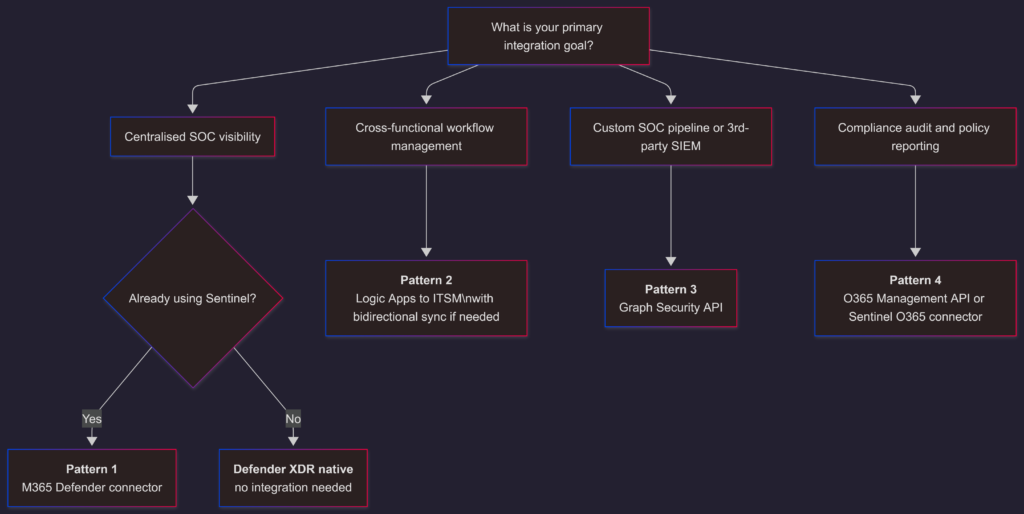
Choosing the right pattern
What’s coming next
The integration patterns cover how data moves between systems. The next post covers how to reduce the manual work inside those systems – automation patterns for DLP incident response, from alert enrichment to containment triggers, and where automation adds value versus where it creates risk.
The views and opinions expressed in this post are solely the author’s own and do not reflect the views of their employer, clients, or any affiliated organisation. Nothing here is professional advice, and no content is based on confidential or client-specific information.
Leave A Comment
0 comments