
Attribution in Agentic Systems: When the user isn’t the actor anymore – Part #2

Attribution in Agentic Systems: When the user isn’t the actor anymore – Part #2
The pattern: User + agent + intent binding (so investigations stop being archaeology  )
)
Part 1 ended with the uncomfortable truth: audit identity is not the same thing as agency. When agents enter the room, the user becomes the principal, the agent becomes the actor, and some connector/service account becomes the execution substrate.
Part 2 is the fix. A practical pattern that keeps those identities distinct and lets you stitch the story back together later, without inventing your own “audit log product”. The end goal is what NIST politely calls “logs stored in sufficient detail for an appropriate period of time”… and what your incident response team calls “please let this be over by lunch.”
This pattern has two artifacts:
- Attribution Envelope (the intent-and-execution “receipt”)
- Execution Chain (correlation IDs propagated everywhere, not vibes)
And yes, we’re going to validate it with real logs, not hand-made fantasy fields.
The demo scenario we’ll use (so screenshots don’t get philosophical)
We’ll use a deliberately simple “agent sends email” scenario, because it touches three different identity layers in one shot.
Identities (all different):
- Principal (human):
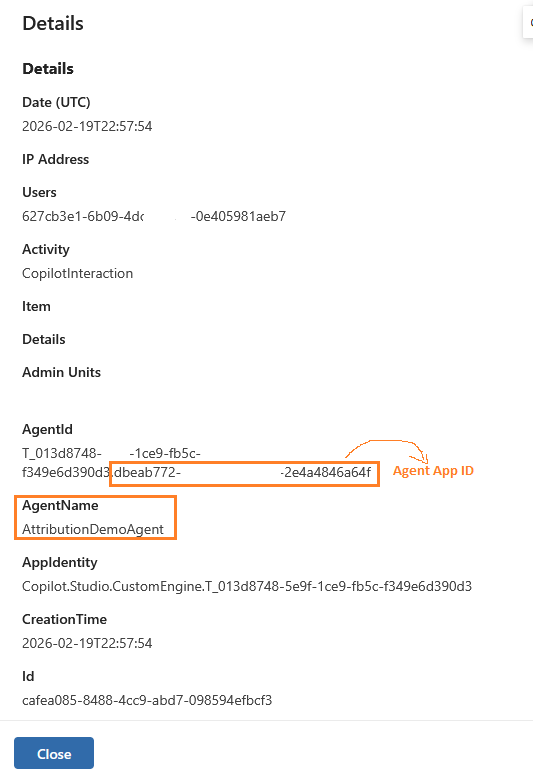
KaiC@.....microsoft.com - Agent (software identity):
AttributionDemoAgent- Agent App ID:
dbeab772-95c0-****-****-2e4a4846a64f
- Agent App ID:
- Tool / execution identity:
AttributionDemoServiceAccount@.....microsoft.com- Flow ID:
f6d4559a-deac-****-****-946afcca6b9f - Environment ID:
f2455496-bc0b-****-****-450302986a0f
- Flow ID:
- Target recipient:
admin@.....microsoft.com
The sequence:
- Kai triggers the agent:
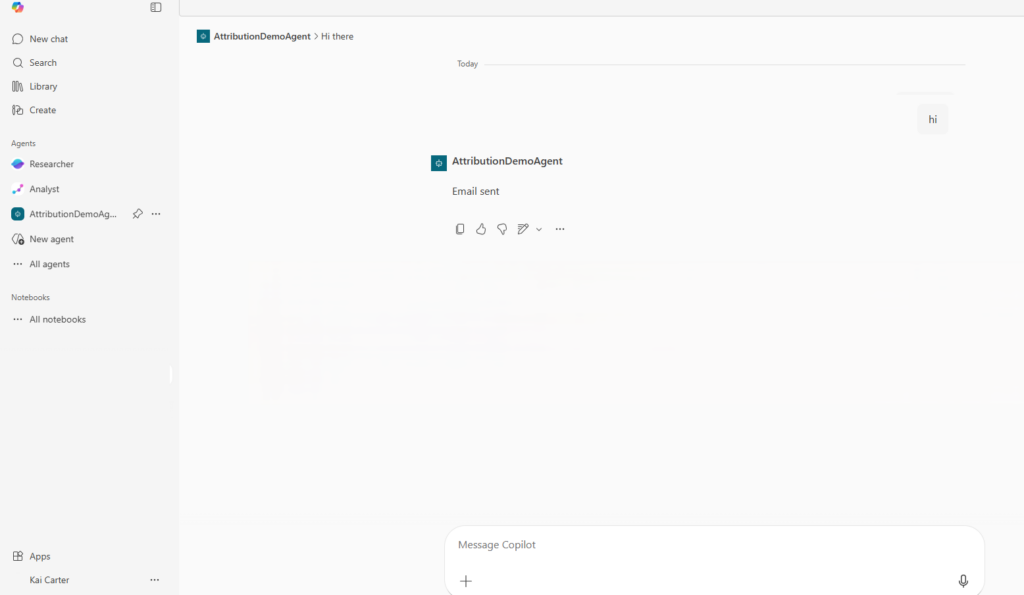
- Agent triggers the Power Automate flow:
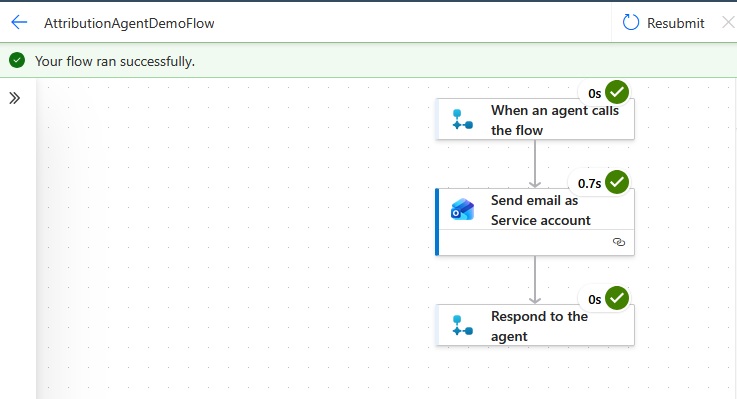
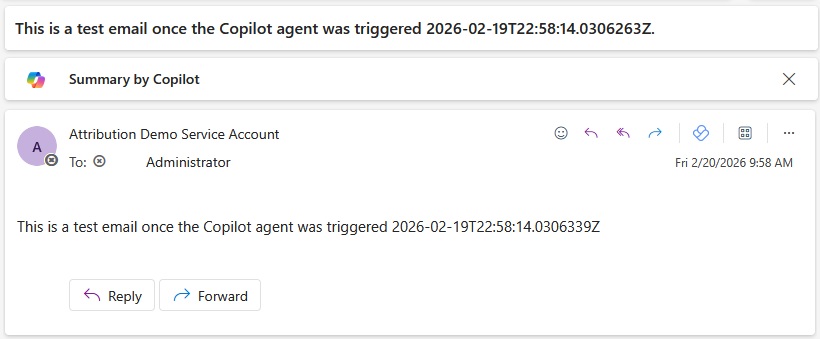
- Flow runs under the service account and sends an email to Admin:
- We prove the chain using audit records + IDs
Step 0: Pick your attribution posture (yes, this is a decision)
Before tooling, decide what you’re optimizing for:
1- Convenience-first (don’t do this outside demos):
- “Run everything as the user”
- Fastest to build
- Turns the user into the default culprit
2- Accountability-first (the pattern):
- Keep Principal, Agent, and Tool identity visible
- Bind user intent explicitly
- Make correlation a first-class requirement
If you want investigations to be survivable, you want accountability-first.
Step 1: Give the agent a real identity (don’t hide it behind the user)
In agent systems, the agent isn’t “a feature”. It’s a software actor. Treat it that way:
- Name it like a component you’d be comfortable subpoenaing later
- Track its AgentID / AppID as a stable identifier
- Track version and deployment changes separately (admin audit)
Microsoft gives you visibility into Copilot/agent interactions via audit logs; for Copilot Interaction events, the audit data can include identifiers like AppHost, ThreadID, Contexts, MessageIDs, and AccessedResources depending on the interaction.
In our run, the host shows as Office because the interaction happened via the M365/Office web host.

Step 2: Define the Attribution Envelope (what “intent binding” actually means)
The envelope is not “extra logging”. It’s the minimum set of fields you need so that six weeks later you can answer:
- Who asked? (principal)
- What did they ask for? (declared intent)
- Which agent decided? (agent identity + version)
- What executed the action? (tool identity / connector / run-as)
- What policy allowed it? (policy decision reference)
- Where is the proof? (links to audit record IDs)
Important:
The envelope is not necessarily one log entry. It can be a stitched record sourced from platform logs + orchestration metadata. That’s literally what investigations are
.
Step 3: Build the Execution Chain (correlation that survives the workflow)
Part 1 promised a CorrelationID that survives the whole workflow. Here’s the blunt reality:
- Some systems will give you a correlation/thread identifier (great).
- Some won’t.
- So you need a strategy that works across boundaries.
The clean pattern is to use W3C Trace Context conventions where you control the hops (your orchestrator / your APIs), and use a “correlation token” you can reliably recover from business objects when you don’t.
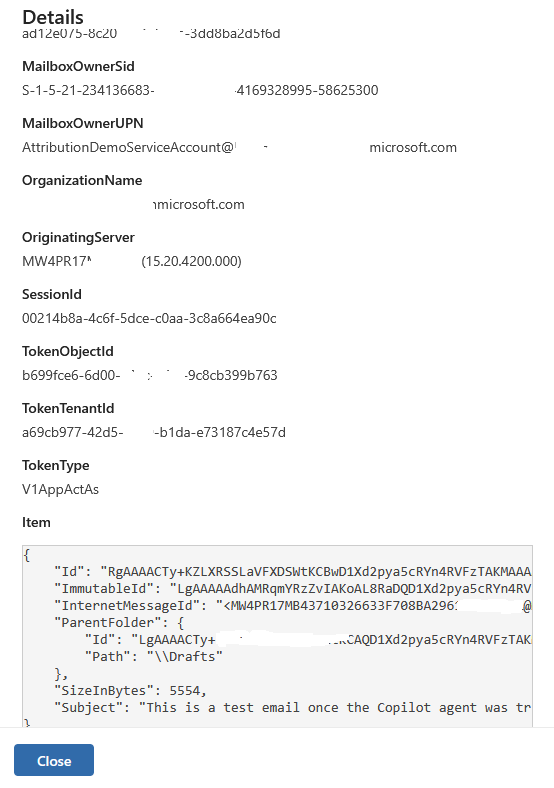
In this demo, we used the simplest correlation token: a timestamp embedded in the email subject, which then shows up in the Exchange audit “Send” event.
Step 4: Prove the agent-to-platform hop (Power Platform audit)
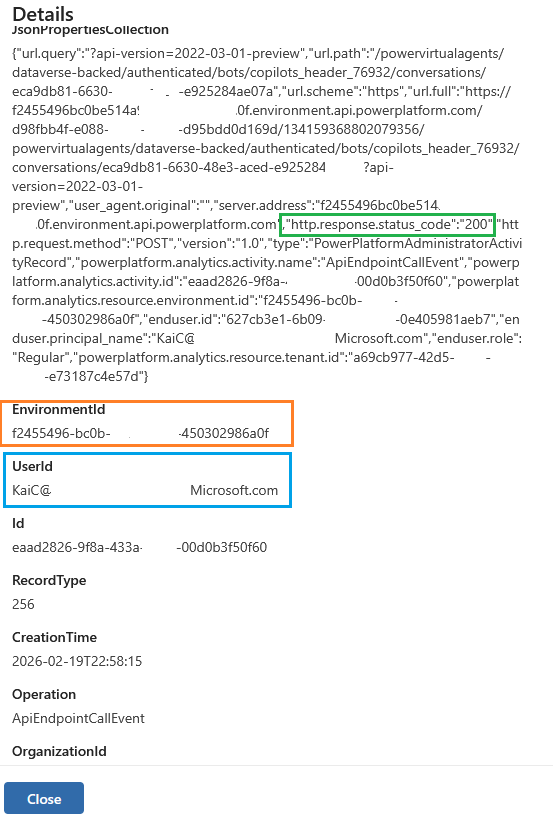
In Purview Audit, this shows up as a Power Platform ApiEndpointCallEvent hitting the bot conversation endpoint (principal → platform hop).
For the agent-to-platform hop, the event that matters is:
Step 5: Prove the tool identity executed the action (Exchange Send audit)
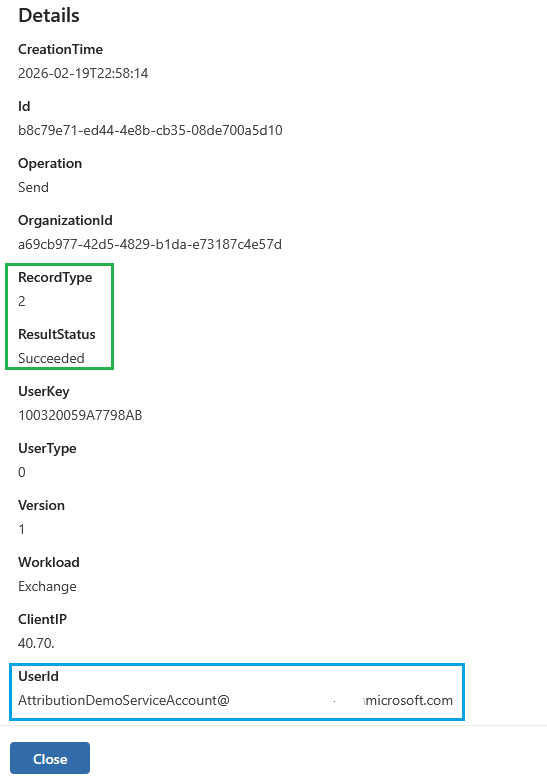
Now we confirm the third identity: the tool identity that executed.
The below demonstrates that tool identity ≠ user identity, and it gives you an audited join point (the subject) to link back to the interaction timeframe.
Step 6: The investigation playbook (aka “why this was worth doing”)
What you want an investigation to feel like
Not:
- “The audit log says Kai did it, case closed.”
But:
- “Kai requested it (principal), AttributionDemoAgent orchestrated it (agent), the service account executed it (tool), and here are the exact audited records that stitch the chain.”
Wrap-up
Part 1 told you why attribution breaks. Part 2 gave you the pattern that fixes it, and proved it with real audit artifacts:
- CopilotInteraction proves the principal + agent + thread
- ApiEndpointCallEvent proves the platform hop + conversation id
- Exchange Send proves the tool identity executed the outcome
If your attribution story can’t survive those three pivots, you don’t have attribution, you have a guessing hobby .
The views and opinions expressed in this post are solely the author’s own and do not reflect the views of their employer, clients, or any affiliated organisation. Nothing here is professional advice, and no content is based on confidential or client-specific information.
Leave A Comment
0 comments