
Why a Search for “admin” might miss “Administrator”

Why a Search for “admin” might miss “Administrator”
If you’ve ever added search to an application, you may have seen something like this. A user searches for a word they use all the time – say, “admin” – and the page that’s genuinely about administrators doesn’t come back where you’d expect. It’s there somewhere in the results, but it’s slipped down the list, under a few pages that feel far less relevant. The natural reaction is to assume something’s gone wrong.
More often than not, it’s not. The search engine is behaving exactly as designed, and once you can see why, the fix turns out to be surprisingly simple. So, let’s walk through what’s happening under the hood.
What happens when you run a search
It helps to know that a full-text query doesn’t run in a single step. In Azure AI Search – and in the Lucene engine underneath it – a query moves through four stages:
- Query parsing – your search text is broken into its parts (individual terms, phrases, any operators) and turned into a small tree of sub-queries.
- Lexical analysis – each of those terms is run through an analyzer, which quietly reshapes them (more on this in a moment). Crucially, the same analyzer was applied to your content when it was indexed.
- Document retrieval – the analyzed terms are looked up against an inverted index, a big table of term → the documents that contain it, to find the candidate matches.
- Scoring – those candidates are ranked, by default using an algorithm called BM25, which considers things like how often a term appears and how long the field is.
Most of the story we’re interested in lives in stages two and four. Let’s take scoring first.
One assumption about ranking
By default, BM25 doesn’t treat your title as anything special – a match is a match, wherever it occurs. But Azure AI Search lets you add a scoring profile that boosts particular fields, and in a lot of real-world setups the title is deliberately given extra weight, because a word appearing in a page’s title is usually a strong hint that the page is really about that word.
For the rest of this article, let’s assume that kind of setup – here’s the scoring profile I’m running, where the title field carries noticeably more weight than the body:
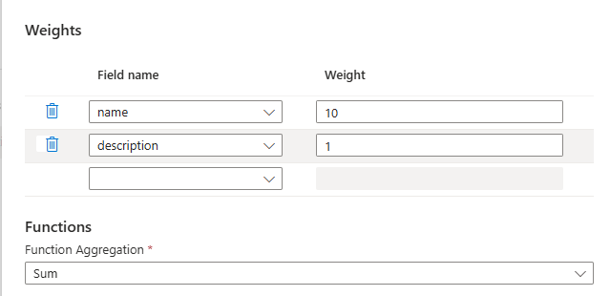
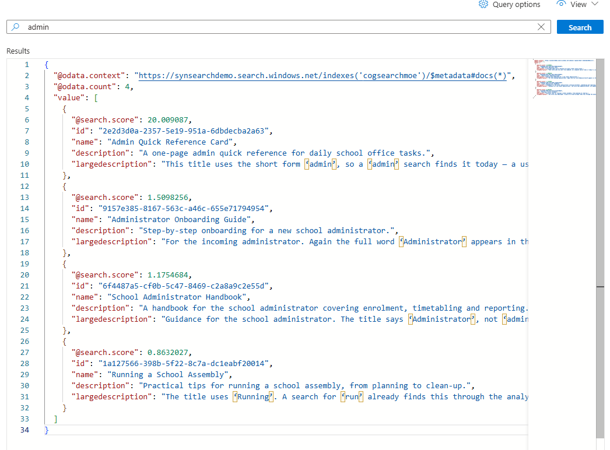
With that in place, the effect is easy to see: when the deciding word isn’t matched in the title, that page loses its biggest source of ranking and drifts down the results – even when it’s clearly the most relevant one.
Here’s that happening in my setup – notice the search score for keyword Maths, so it earns none of that weighting:
The analyzer, and why “run” happily finds “running”
Now to lexical analysis – the step that quietly explains everything. Before any text is stored or searched, the analyzer reshapes it, roughly like this:
1.  Tokenise    "Managing Administrators"  →  managing | administrators
2.  Normalise   lowercase, strip punctuation
3.  Stem        reduce each word to a base form
That last step, stemming, is the one to keep an eye on. The rule that governs matching is simple: two words match only if they reduce to the same base token – and remember, the same analyzer runs over both your content and your query.
This is why a search for run cheerfully finds running:
stored:  "running"  → stem → run
query:   "run"      → stem → run     ✓ same token, they match
Stemming is built to strip grammatical endings like -ing, -s, and -ed, so run, runs, and running all fold down to run. It happens automatically, and it’s genuinely helpful.
So why doesn’t “admin” find “Administrator”?
Let’s send that pair through the very same pipeline:
stored:  "Administrator"  → stem → administr
query:   "admin"          → stem → admin     ✗ different tokens, no match
Here’s the heart of it: admin isn’t a grammatical form of administrator – it’s a shortened, informal version of the word. Stemming knows how to remove endings, but it has no rule for expanding an abbreviation back into its full form. So the two reduce to different tokens, the title earns nothing for the search, and (under our assumed title-weighting) the page slides down the list.
It’s the same story with plenty of everyday pairs. A search for “maths” won’t match a page titled Mathematics for exactly this reason – one is a clipped, casual form of the other, not an inflection of it.
And it’s worth gently setting aside one tempting idea: fuzzy matching won’t rescue this. Fuzzy search is designed to forgive typos – words that are one or two character edits apart. Getting from admin to administrator, or maths to mathematics, takes far more edits than that, and widening the tolerance enough to catch them would start pulling in all sorts of unrelated words. It’s simply the wrong tool for this particular job.
A nice way to sum it all up: stemming connects the different forms of a single word, but it can’t connect two genuinely different words that happen to mean the same thing. That second job needs something purpose-built.
And that’s really the crux of it. The reason a search for “admin” can quietly miss a page titled “Administrator” isn’t a bug or a misconfiguration – it’s simply how full-text search works. It matches the forms of a word, not the meanings behind them, and our two words are related in meaning but not in form. The good news, and the reason I won’t leave you on a cliffhanger for long, is that the fix is genuinely small: it lives entirely at query time, it doesn’t involve rebuilding your index, and once you’ve seen it you’ll find yourself reaching for it often. That’s exactly where we’ll pick things up in the next post – turning everything we’ve just worked out into a working solution.
The views and opinions expressed in this post are solely the author’s own and do not reflect the views of their employer, clients, or any affiliated organisation. Nothing here is professional advice, and no content is based on confidential or client-specific information.
Leave A Comment
0 comments