
Teaching Search That ‘admin’ Means ‘Administrator

Teaching Search That ‘admin’ Means ‘Administrator
In the last post, we went looking for why a search for “admin” can slip straight past a page that’s genuinely about an Administrator – even when it’s clearly the most relevant result. What we found is that this isn’t a fault at all, but the very nature of full-text search: it breaks each word down to a base form and matches on that, which is why “run” happily finds “running”, but “admin” never quite reaches “administrator”. Stemming connects the different forms of a single word; it just can’t connect two different words that happen to mean the same thing. We ended by saying that second job needs something purpose-built – so in this post, that’s exactly what we’re going to build.
So how do we solve this?
This is where the hero of the story arrives: the synonym map.
A synonym map does the one thing the analyzer can’t – it lets you state, as a fact, that certain words are equivalent, and it does so without touching your content or rebuilding your index. In Azure AI Search it’s a small, readable resource, and it supports two kinds of rules:
{
  "name": "content-synonyms",
  "format": "solr",
  "synonyms": "WA => Washington\nadmin, administrator\nlaptop, notebook"
}Those three lines show both styles you’ll use:
- An acronym mapping – WA => Washington. The => makes this a one-directional expansion: when someone searches for WA, the engine also looks for Washington. This is the pattern you’ll reach for with acronyms and codes, where you want the short form to find the full one. (It’s the same example Microsoft uses in their own documentation.)
- Two equivalence groups – admin, administrator and laptop, notebook. Separated by commas, these work in both directions: a search for any term in the group matches content containing any of the others. This is what you’ll use for synonyms and informal variants.
Same search as before, nothing else changed but the synonym map – and the same results search score goes up, with the title now matching:
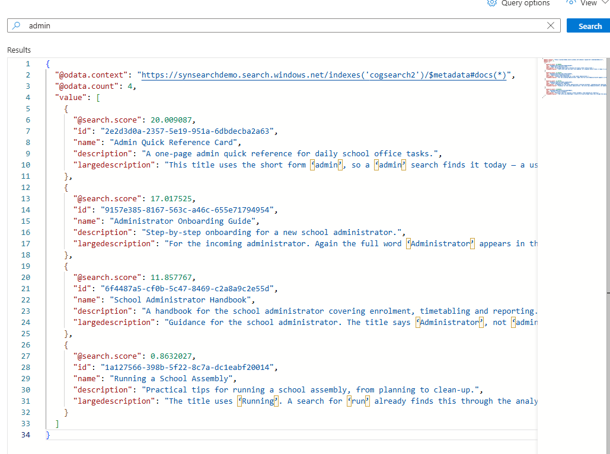
How to create the synonym map
Creating one takes just a couple of minutes with a REST client like Bruno or Postman. Here’s the whole flow:
Step 1 – Get the admin api-key. In the Azure portal, open your Search service and copy an admin key (Keys → admin key). Create and update calls need the admin key, not the query key.
Step 2 – Create the synonym map.
Send a POST to the synonymmaps endpoint:
POST https://<ServiceName>.search.windows.net/synonymmaps?api-version=2026-04-01Headers
Content-Type: application/json
api-key: <admin key from step 1>Body
{
  "name": "content-synonyms",
  "format": "solr",
  "synonyms": "WA => Washington\nadmin, administrator\nlaptop, notebook"
}A successful call returns 201 Created.
Step 3 – Attach it to your searchable fields. The map won’t do anything until it’s bound to a field. Update your index and add the map to the fields you search against – usually the title and description – by setting "synonymMaps": ["content-synonyms"] on each. This is an index update, not a rebuild, so there’s no reindexing and the change is effectively instant.
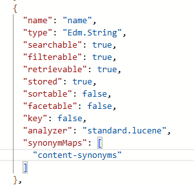
And that’s essentially it. Two things make this approach a pleasure to work with:
- It applies at query time, with no reindexing. You’re not reprocessing content or rebuilding anything. Attach the map, and the very next query behaves differently; remove it, and things revert just as quickly.
- It fixes ranking, not just matching. Once admin is treated as equivalent to administrator, the title matches – so, under our assumed title-weighting, that page finally earns its points and climbs back to where you’d expect it.
Building and looking after one
Putting a synonym map together is mostly a content conversation rather than an engineering task. It helps to sit down with the people who know the domain and gather the everyday shortenings, the acronyms, the plain-language versions of jargon, and the regional spellings that people actually type.
One question worth sitting with
I’ll finish with something to mull over rather than a tidy bow.
A synonym map works. It’s low-risk, it applies instantly, it’s easy to undo, and it solves the exact problem in front of you. For the immediate need, I think it’s genuinely the right first move.
But it’s worth being honest about what you’re signing up for. From here, you’re maintaining a list of equivalent words – by hand – more or less indefinitely. Every new acronym, every product rename, every additional language, every bit of insider vocabulary becomes another line someone has to notice, agree on, and add. Miss one, and the search quietly falls short again, in the way that’s hardest to spot.
So the question I keep coming back to isn’t “does a synonym map fix this?” – it plainly does. It’s a little more reflective than that: is hand-curating a list of every way people might phrase something – something we’re happy to maintain for the long haul, or is it a stepping stone to something better?
The views and opinions expressed in this post are solely the author’s own and do not reflect the views of their employer, clients, or any affiliated organisation. Nothing here is professional advice, and no content is based on confidential or client-specific information.
Leave A Comment
0 comments